
Screenshots


Introduction
Ghost Detector: Ectify is an intriguing app developed by Alexandre Grisey that transforms your smartphone into an immersive ghost-hunting tool. Whether you are venturing into allegedly haunted locations with friends or conducting solo investigations for social media content, Ectify provides you with an array of features designed to enhance your paranormal exploration experience. This app is packed with functionalities including real-time electromagnetic field (EMF) detection, a spirit box and EVP generator, and session recording capabilities, allowing users to capture and share their ghost-hunting adventures. However, it is important to note that Ectify is purely for entertainment purposes and does not have scientific backing for ghost detection.
Graphics & Gameplay
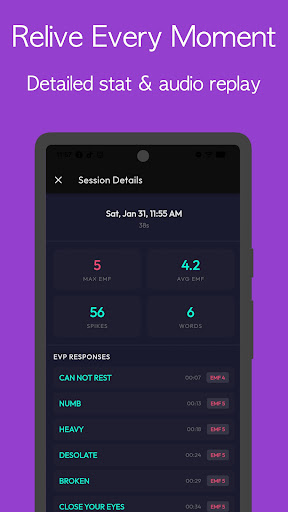
The visual design of Ghost Detector: Ectify is sleek and modern, evoking an authentic investigative atmosphere. The app features a dark mode interface that is optimized for low-light conditions, making it suitable for night-time ghost hunting. The EMF readings are displayed prominently, with large, easy-to-read values that change in real-time based on the magnetic fields detected by your device. The spirit box interface showcases a curated word bank, allowing users to see responses based on environmental changes. Each session is visually engaging, with haptic feedback that enhances the thrill during EMF spikes. The app’s layout is also optimized for content sharing on platforms like TikTok and Instagram, featuring portrait modes that cater to modern content creators. Overall, Ectify’s graphics and gameplay are designed to immerse users in an authentic ghost-hunting experience.
Key Features
- Real-Time EMF Detection: Utilize your smartphone’s built-in magnetometer to scan for fluctuations in electromagnetic fields, providing an interactive ghost-hunting experience.
- Spirit Box & EVP Generator: Generate unique responses during your sessions using a curated word bank, allowing for compelling spirit communication.
- Record & Share Sessions: Capture audio from your ghost-hunting sessions, including EMF spikes and spirit box responses, and share them directly on social media platforms.
- Session History: Keep track of every investigation with timestamps, enabling users to review past sessions and build a portfolio of their ghost-hunting experiences.
- Designed for Immersive Sessions: Features like one-tap session starts, haptic feedback, and offline functionality create an easy and engaging user experience.
- Content Creator Optimized: The app supports portrait layouts for social media, instant audio exports, and shareable designs for screenshots.
- Free to Start: Users can enjoy the core functionalities with a free tier, with an option to unlock everything through a one-time purchase.
Mod Features
While the original Ghost Detector: Ectify app offers a compelling experience, a modded version could enhance user enjoyment with the following features:
- Premium Unlocked: Access all premium features without the need for a one-time purchase, allowing users to enjoy the full range of functionalities right away.
- No Ads: Experience an uninterrupted ghost-hunting adventure without intrusive ads, providing a smoother and more enjoyable experience.
- Unlimited Money: Users could benefit from unlimited in-app currency to customize their experiences and unlock various features without restrictions.
- Enhanced Graphics: A mod could include improved graphics and animations for a more immersive experience during ghost-hunting sessions.
How to Install APK on Android
Installing the Ghost Detector: Ectify APK on your Android device is a straightforward process. Follow these steps to get started:
- Download the APK File: Visit the official download link provided and download the APK file to your device.
- Enable Unknown Sources: Go to your device’s settings, navigate to Security, and enable “Install from Unknown Sources” to allow the installation of applications outside the Google Play Store.
- Locate the APK File: Using a file manager, find the downloaded APK file on your device.
- Install the APK: Tap on the APK file and follow the on-screen instructions to install the app.
- Open the App: After installation, locate the app icon on your device’s home screen or app drawer and tap to open it. You are now ready to start your ghost-hunting adventure!
Call To Action
Ready to embark on your ghost-hunting journey? Download Ghost Detector: Ectify now and turn your smartphone into a powerful tool for paranormal investigation. Click here to start your adventure!