
Astrospheric: The Ultimate Weather Tool for Astronomers
Screenshots


Introduction
Astrospheric is an advanced weather application specifically designed for professional astronomers and astrophotographers. Developed by Daniel Fiordalis, this app offers a suite of tools to help users make informed decisions about their stargazing and astrophotography sessions. With its unique features tailored to the needs of the astronomical community, Astrospheric empowers users to plan their observations under optimal conditions. The app supports hundreds of astronomical societies by providing tools that foster communication and collaboration among members.
Graphics & Gameplay
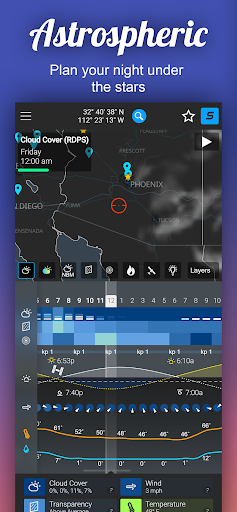
The visual presentation of Astrospheric is clean and intuitive, making it easy for users to navigate through various features. The main dashboard features a sleek layout that displays essential weather information at a glance, including cloud cover, temperature, and humidity levels. The use of color-coded graphics helps users quickly assess the current and forecasted sky conditions.
In the screenshots, you can see a variety of visual elements, such as:
- Forecast Graphs: Detailed graphical representations of weather data over the next 84 hours, allowing users to visualize changes in conditions.
- Astronomical Data: Clear indicators for the Kp index, which is crucial for Aurora viewing, along with precise rise and set times for the sun and moon.
- Cloud Coverage Maps: Interactive maps that showcase cloud forecasts and transparency reports, essential for planning stargazing outings.
Overall, the graphics in Astrospheric enhance the user experience by providing critical information in a visually appealing manner.
Key Features
- 84-Hour Hourly Forecast: Access detailed weather forecasts that help you plan your astronomical observations.
- CMC Astronomy Data: This unique feature offers updates every 6 hours, providing data that other services do not.
- Ensemble Cloud Forecast: Compare major forecast models with hourly updates (available in Astrospheric Pro).
- Kp Index Alerts: Get notifications for Aurora viewing conditions (available in Pro).
- ISS Flyover Paths: Track the International Space Station with precise timing and paths.
- Smoke Forecast Integration: Unique to Astrospheric, this feature helps assess sky transparency effectively.
- Weather Alerts: Set criteria for weather alerts to receive notifications when conditions are ideal (Astrospheric Pro).
- Site Mode: Quickly set up your GOTO tracking mount with essential information, even without a network connection.
Mod Features
If you're looking for an enhanced experience beyond the standard offerings, consider using a modded version of Astrospheric. Here are some plausible mod features you might find:
- Premium Unlocked: Access all premium features, including advanced weather alerts and ensemble cloud forecasts, without a subscription.
- No Ads: Enjoy an uninterrupted experience while using the app, free from advertisements.
- Unlimited Money: If applicable, gain unlimited access to in-app purchases, allowing you to customize your experience fully.
How to Install APK on Android
Installing the Astrospheric APK on your Android device is a straightforward process. Follow these steps to get started:
- Download the APK: Click on the provided link to download the Astrospheric APK file directly to your device.
- Enable Unknown Sources: Go to your device's Settings, then navigate to Security. Enable "Install from Unknown Sources" to allow the installation of APK files.
- Locate the APK: Use a file manager app to find the downloaded APK file in your device's Downloads folder.
- Install the APK: Tap on the APK file and follow the on-screen instructions to install the app.
- Open Astrospheric: Once installed, open the app from your app drawer and set it up according to your preferences.
Conclusion
Astrospheric stands out as a must-have app for anyone serious about astronomy or astrophotography. Its extensive features, dedicated to providing accurate and timely weather data, make it a valuable tool for both professionals and enthusiasts alike. The intuitive interface and visually appealing graphics enhance the overall user experience, making it easy to navigate through the various functionalities. If you're ready to take your stargazing to the next level, download Astrospheric today!
Call to Action: Don't miss out on optimal stargazing conditions—[Download Astrospheric here](https://apkgk.com/com.astrospheric.dfior.astrospheric) and elevate your astronomical experiences!